1. SustainML Framework using Dockers
The instructions for installing the SustainML Framework using Dockers are provided in this page. It is organized as follows:
The SustainML Framework is composed of different software modules, each one related to specific task, which are specialized in solving the different parts of the framework. Each of the modules conforms a Node, which shall import its corresponding Python library, so that each node can be abstracted from the communication between other nodes.
The following sections describe the steps to install the SustainML Framework using Dockers.
1.1. SustainML Framework dependencies
Docker is a platform that allows to develop and run applications in virtual containers. Install Docker following the installation instructions of the Docker documentation.
To run the SustainML Framework using Docker, a Dockerfile is required to build the Docker image with all the required configuration. Also, a Docker compose file is required to deploy all the nodes that conform the SustainML Framework, using the previous Docker image. Finally, a bash script file is required to run the selected node based on an input argument.
The following command downloads both Dockerfile, Docker compose and script files:
mkdir -p ~/SustainML && cd ~/SustainML && \
wget https://raw.githubusercontent.com/eProsima/SustainML-Framework/main/docker/Dockerfile && \
wget https://raw.githubusercontent.com/eProsima/SustainML-Framework/main/docker/docker-compose.yaml && \
wget https://raw.githubusercontent.com/eProsima/SustainML-Framework/main/docker/run.bash
mkdir -p ~/SustainML && cd ~/SustainML && \
wget https://raw.githubusercontent.com/eProsima/SustainML-Framework/main/docker/Dockerfile && \
wget https://raw.githubusercontent.com/eProsima/SustainML-Framework/main/docker/docker-compose.yaml && \
wget https://raw.githubusercontent.com/eProsima/SustainML-Framework/main/docker/run.bash
The SustainML Framework GUI application requires special privileges to access the X server. To provide them, XQuartz and socat need to be installed:
brew install --cask socat xquartz
The SustainML Framework also requires some dependencies to be installed in the host machine. Run the following commands to install and deploy ollama and llama3:
curl -fsSL https://ollama.com/install.sh | sh && \
ollama pull llama3 && ollama pull mistral-small
curl -fsSL https://ollama.com/install.sh | sh && \
ollama pull llama3 && ollama pull mistral-small
1.2. Build the SustainML Framework Docker image
The Dockerfile defines the set of dependencies and configurations required to build a image with the SustainML Framework. The following command builds the Docker image using the downloaded Dockerfile, setting the image name as sustainml, and tagged as version v0.2.0.
docker build -f ~/SustainML/Dockerfile -t sustainml:v0.2.0 .
docker build -f ~/SustainML/Dockerfile -t sustainml:v0.2.0 .
1.3. SustainML Framework Docker deployment
Important
Before running the framework, make sure you have set the HF_TOKEN environment variable on your host to your personal Hugging Face access token.
Note
You can also override the default DDS domain ID for all nodes by setting the environment variable SUSTAINML_DOMAIN_ID on the host before launching the containers.
To run the SustainML Framework using Dockers, execute the following command:
Provide privileges to the X localhost server and deploy the SustainML Framework using Docker compose:
xhost local:root && \
docker compose up
Open a XQuart terminal (required in the MacOS section of the SustainML Framework dependencies).
open -a XQuartz
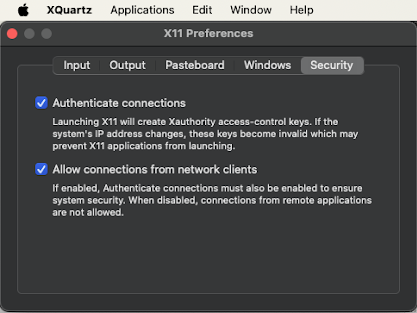
Ensure that the security setting Allow connections from network clients is enabled in the XQuartz preferences.

Note
The XQuartz terminal may require to be restarted to apply the changes.
In the XQuartz terminal, provide privileges to the X private server and set the display environment variable. To do so, introduce your private IP address in the following command, and then deploy the SustainML Framework using Docker compose:
socat TCP-LISTEN:11000,reuseaddr,fork UNIX-CLIENT:\"$DISPLAY\" && \
xhost + your.private.ip.address && \
export DISPLAY="your.private.ip.address:0" && \
docker compose up